Hey, take a look at my website..
Recently I was deploying something to my kind kubernetes cluster and wondered how I could show the work to my colleague. In the past I played with ngrok to expose my localhost to the interwebs, but on kubernetes I would need to do some portforwarding kung-fu that was not an option.
Then I saw that Ngrok launched an operator that can easily expose your dodgy containers to the web with a simple creation of a Ingress.
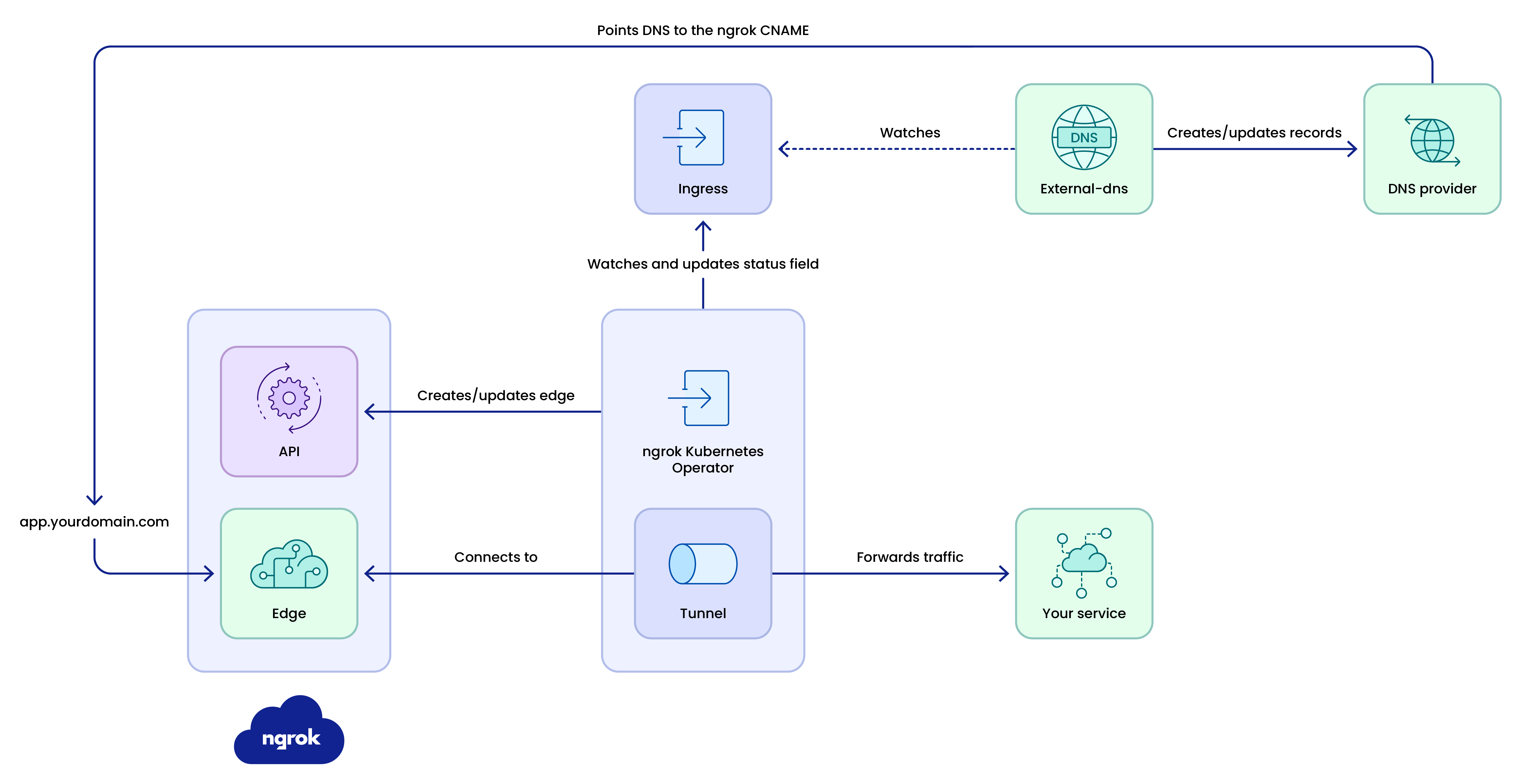
It’s pretty simple to use, steps are,
- Create an Ngrok free account
- Install the operator
- Deploy whatever you want to expose - Example, Podinfo
- Create an ingress like the one below, just replace the host with your Ngrok full Domain Name
apiVersion: networking.k8s.io/v1
kind: Ingress
metadata:
 name: example-ingress
spec:
 ingressClassName: ngrok
 rules:
   - host: YOUR_NGROK_DOMAIN_HERE
     http:
       paths:
         - path: /
           pathType: Prefix
           backend:
             service:
               name: example-service
               port:
                 number: 80
Wait a few seconds and you should have the URL when you describe the ingress you just created
kubectl get ing -A
Happy localhosting.