Ever get lost in your git log?

We’ve all been there: trying to figure out what happened in a project by staring at the default git log output. It’s like trying to read a novel written on receipt paper.
After years of squinting at commit hashes and timestamps, I finally found the solution that changed everything.
The one git alias you actually need
git config --global alias.lg 'log --graph --pretty=format:"%Cred%h%Creset -%C(yellow)%d%Creset %s %Cgreen(%cr) %C(bold blue)<%an>%Creset" --abbrev-commit'
Now just type git lg and behold:
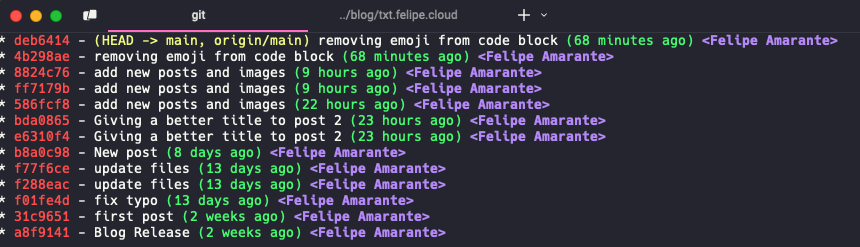
What makes this so good?
- Visual branching with the
--graphoption - Color-coded information that’s actually readable
- Compact format showing just what you need
- Branch references clearly visible
- Relative time so you know if it was “2 days ago” instead of some timestamp
How to set it up?
Just copy and paste that one command into your terminal. That’s it.
If you prefer, add it directly to your .gitconfig file:
[alias]
    lg = log --graph --pretty=format:"%Cred%h%Creset -%C(yellow)%d%Creset %s %Cgreen(%cr) %C(bold blue)<%an>%Creset" --abbrev-commit
Now you’ll never get lost in your git history again. You’re welcome.