Ever get lost in your git log?

We’ve all been there: trying to figure out what happened in a project by staring at the default git log output. It’s like trying to read a novel written on receipt paper.
After years of squinting at commit hashes and timestamps, I finally stopped suffering.
The one git alias you actually need
git config --global alias.lg 'log --graph --pretty=format:"%Cred%h%Creset -%C(yellow)%d%Creset %s %Cgreen(%cr) %C(bold blue)<%an>%Creset" --abbrev-commit'
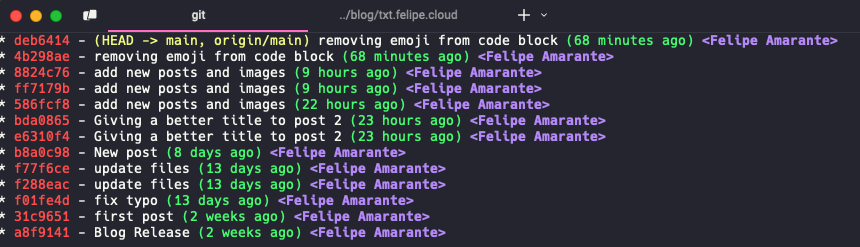
Now just type git lg and behold:
What makes this so good?
The --graph draws your branch tree. Everything is color-coded so you can actually read it. Branch references are visible without hunting, and timestamps say “2 days ago” instead of an ISO blob. The default git log is a wall of text. This isn’t.
How to set it up?
Just copy and paste that one command into your terminal. That’s it.
If you prefer, add it directly to your .gitconfig file:
[alias]
    lg = log --graph --pretty=format:"%Cred%h%Creset -%C(yellow)%d%Creset %s %Cgreen(%cr) %C(bold blue)<%an>%Creset" --abbrev-commit
Now you’ll never get lost in your git history again. You’re welcome.